• Wassermelder WWD 240 Erklärvideo
  • Wassermelder WWD 240 Produktbild
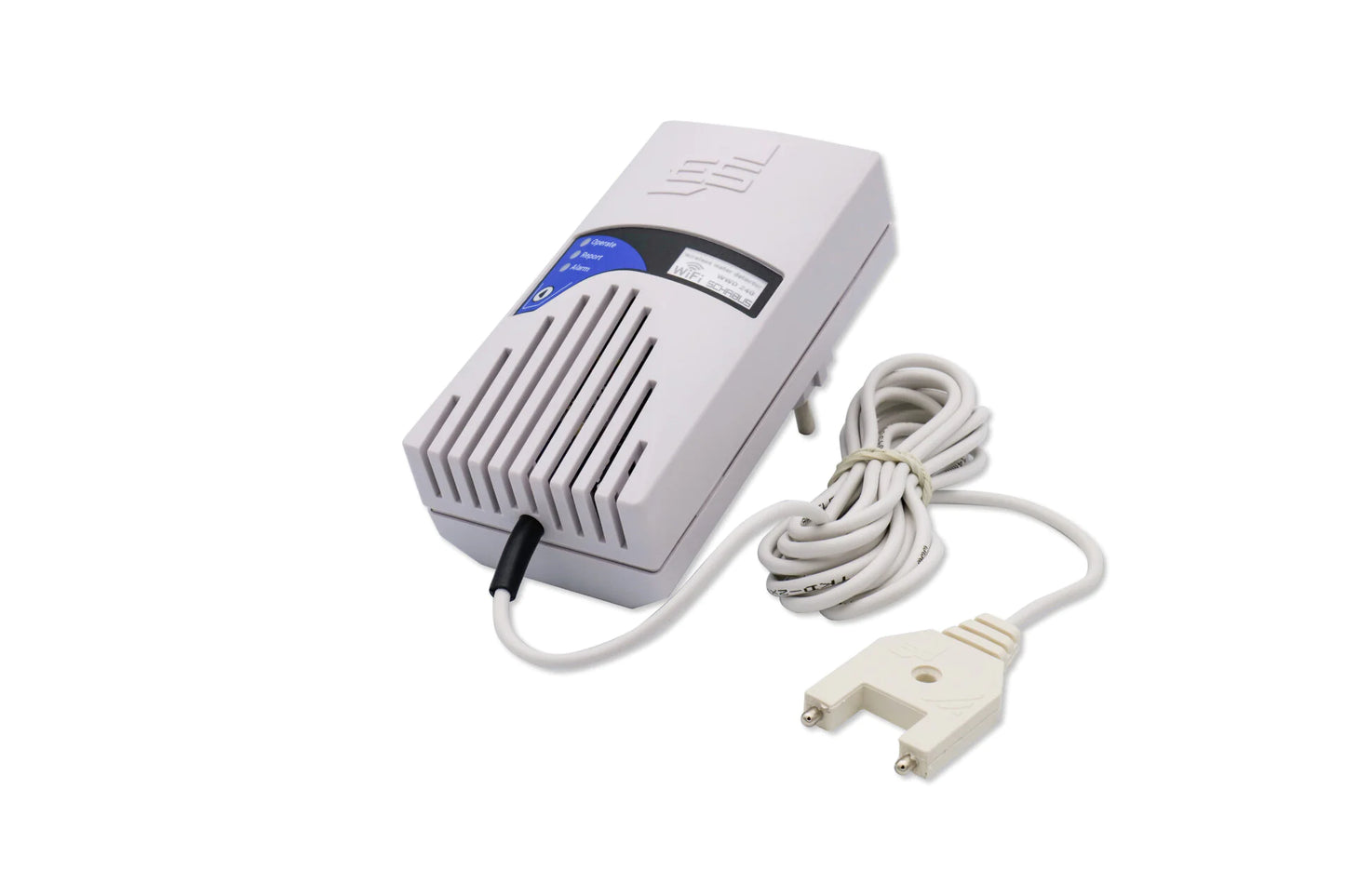
  • WWD 240 Smart Water Detector 230 VAC/50Hz/Schuko Plug
  • WWD 240 Smart Water Detector 230 VAC/50Hz/Schuko Plug
  • Wassermelder WWD 240 Erklärvideo
  • WWD 240 Smart Water Detector 230 VAC/50Hz/Schuko Plug
  • Wassermelder WWD 240 Produktbild
  • WWD 240 Smart Water Detector 230 VAC/50Hz/Schuko Plug

WWD 240 Smart Water Detector 230 VAC/50Hz/Schuko Plug

WWD 240 Smart Water Detector 230 VAC/50Hz/Schuko Plug

Normal price 159,00 €
Normal price Selling price 159,00 €
Sale Sold out
including VAT plus Versandkosten
  • Easy installation (230 V socket device)
  • Proven fork sensor with 2.8 m LIYY control cable (extendable on request)
  • acoustic and visual alarm message
  • Push notifications, Smart Life - Install the Smart Living app and register for free
  • Water ingress, leaks, puddle formation
  • Discounts for specialist companies & resellers
  • Personal expert advice (no call center!)
  • Repair service beyond the statutory warranty

Item number: 500240

Delivery time: 2-3 working days

View full details
WWD 240 Smart Water Detector 230 VAC/50Hz/Schuko Plug

WWD 240 Smart Water Detector 230 VAC/50Hz/Schuko Plug

159,00 €
  • Description
  • Technical information
  • Downloads
  • FAQ - Frequently asked questions
  • Reviews

📦 Scope of delivery

  • Water detector WWD 240 including fork sensor

  • On 2.8 m LIYY control cable

  • Mounting material (1 screw, 1 dowel)

  • Operating instructions

💧 Water alarm with app connection – the smart WWD 240

Unnoticed leaks cause high costs – whether it's a leaky washing machine, a burst pipe, or basement water intrusion. The WWD 240 provides reliable protection: If the sensor detects water, an audible alarm and a visual LED signal sound .
With the Smart Life app (Smart Life – Smart Living), you also receive push notifications on your smartphone – even when you're on the go. When the sensor dries, the signal automatically stops and the LED returns to green.


🚀 Features & Benefits of the Smart Life App

  • 📱 Push notification in case of alarm – immediately informed, no matter where you are

  • 📲 Free app for Android & iOS – intuitive onboarding in just a few steps

  • 💡 Visual alarm indication on site – LED flashes in addition to the app message

  • 🌐 Wi-Fi connection via 2.4 GHz – stable connection for secure messages


⚙️ Easy installation – ready to use

  1. Place detector at the desired location

  2. Place the sensor near the ground

  3. Connect to Wi-Fi & register in the Smart Life app – done ✅

Typical locations:

  • Basement rooms 🧱

  • Laundry rooms 🧺

  • Boiler rooms 🔥

  • Holiday apartments/second homes 🏡


Your benefits at a glance

  • 📱 Real-time app alarm + local signal generator

  • 📢 Clear warning tone (approx. 85 dB) – clearly audible, even through doors

  • 🔄 Automatic reset – no manual operation required

  • 📏 Sensor cable extendable up to 50 m

  • 🛡️ Ideal for interiors with a risk of moisture


⚠️ Note on use
The WWD 240 is designed for regularly dry areas (e.g. under washing machines, in technical/cellar rooms).
It is unsuitable for permanently damp environments such as shafts, tanks or containers.
👉 For applications with a minimum water level of 4 cm or more, we recommend WWD 241 with mini float switch.


🔧 Flexible sensor cable – even over long distances
Standard length 2.8 m , extendable up to 50 m (cross section max. 2 × 0.14 mm² ).
Important:

  • Cut the cable and connect it with terminals

  • Alternatively: pre-assembled special lengths directly from Elektrotechnik SCHABUS

🧪 Line: LIYY control line
Flame-retardant, low-adhesion, self-extinguishing and largely resistant to oils, greases, coolants and lubricants – only temporarily waterproof .

⚠️ Safety notice
Never lay LIYY cables parallel to 230 V mains cables (interference/safety risks).

📡the Smart-Live – Smart-living app

📱 App download

WEEE NO.: DE91394868

Operating voltage 230V ~ (+/-10%)V AC / 50-60Hz
Functional area -15°C / +40°C
Protection class IP20
Dimensions(WxWxD)

118x60x44mm

Power consumption 0.8 W, in standby
Weight 0.28 kg
Line 2.8 m | 2×0.14mm2, LIYY cable, extendable
Sound pressure level 90 dB (10 cm distance), Piezo
Wifi 802.11 b/g/n

1. 🔌 Does the WWD 240 need to be permanently installed? No – the WWD 240 is a Plug-in device (230 V). Simply plug it into a free socket, place the sensor and connect it to the Smart Life app - done.

2. 📱 Is the Smart Life app really free? Yes, the Smart Life app (Smart Life – Smart Living) is available free of charge for Android and iOS. After registering, you can immediately integrate the WWD 240 and activate push notifications.

3. 💧 Can the sensor remain permanently submerged in water? No – the fork sensor is for the short-term contact with water designed. After an alarm, it should dry again as quickly as possible. For permanently humid environments, we recommend alternative products (e.g. WWD 241).

4. 🔊 How loud is the alarm? The integrated signal generator reaches approx. 85dB – loud enough to be heard in adjacent rooms or through doors.

5. 📏 Can I extend the sensor cable? Yes - the 2.8 m long LIYY control cable can be adjusted up to 50 m extend (cross section max. 2 × 0.14 mm²). On request, Elektrotechnik SCHABUS also delivers pre-assembled special lengths.

6. 🌐 Do I need a special Wi-Fi network for the app to connect? The WWD 240 only requires a 2.4GHz WiFi network. 5GHz is not supported.

7. 🏠 Where is the best place to use the WWD 240? Typical areas of application are Cellar rooms, laundry rooms, boiler rooms and holiday apartments – wherever unnoticed leaks can cause damage.

Checklist for installation problems:

  • Netzwerkprobleme:
    Überlasteter Router: Wenn zu viele Geräte gleichzeitig mit dem Router verbunden sind, kann es zu Problemen kommen. Trennen Sie einige Geräte vorübergehend, um den Router zu entlasten. Router-Einstellungen: Überprüfen Sie, ob Ihr Router 2,4 GHz unterstützt, da viele Smart-
    Home-Geräte diesen Frequenzbereich benötigen. Router-Name und Passwort: Stellen Sie sicher, dass der WLAN-Name (SSID) und das Passwort korrekt eingegeben wurden. Router-Reichweite: Stellen Sie sicher, dass sich das Gerät in Reichweite des Routers befindet.
  • Geräteprobleme:
    Reset: Setzen Sie das Gerät auf die Werkseinstellungen zurück. Wie das geht, hängt vom Gerät ab, aber oft ist es ein längeres
    Drücken einer Reset-Taste oder ein Einund Ausschalten in bestimmten Intervallen (z.B. dreimal ein- und ausschalten). Firmware-Update: Überprüfen Sie, ob für das Gerät ein Firmware-Update verfügbar ist und installieren Sie es.
  • App-Probleme:
    App-Version: Stellen Sie sicher, dass Sie die neueste Version der Tuya Smart App verwenden. App-Berechtigungen: Überprüfen Sie, ob die App die erforderlichen Berechtigungen für den Zugriff auf das WLAN und den Standort hat. App-Cache leeren: Löschen Sie den Cache der App in den Einstellungen Ihres Smartphones. App neu installieren: Wenn alles andere fehlschlägt, versuchen Sie, die App zu deinstallieren und erneut zu installieren.
  • Verbindungsprozess:
    Blinken des Geräts: Achten Sie darauf, dass das Gerät während der Verbindung blinkt, was den Netzwerk-Verbindungsmodus anzeigt.
    Warten Sie 10 Sekunden, um zu bestätigen, dass das Gerät blinkt, bevor Sie fortfahren. Gerät hinzufügen: In der App gehen Sie auf "Gerät hinzufügen" oder das Plus-Symbol, wählen die passende Gerätekategorie und den WLAN-Typ aus.

Customer Reviews

Be the first to write a review
0%
(0)
0%
(0)
0%
(0)
0%
(0)
0%
(0)
Description

📦 Scope of delivery

  • Water detector WWD 240 including fork sensor

  • On 2.8 m LIYY control cable

  • Mounting material (1 screw, 1 dowel)

  • Operating instructions

💧 Water alarm with app connection – the smart WWD 240

Unnoticed leaks cause high costs – whether it's a leaky washing machine, a burst pipe, or basement water intrusion. The WWD 240 provides reliable protection: If the sensor detects water, an audible alarm and a visual LED signal sound .
With the Smart Life app (Smart Life – Smart Living), you also receive push notifications on your smartphone – even when you're on the go. When the sensor dries, the signal automatically stops and the LED returns to green.


🚀 Features & Benefits of the Smart Life App

  • 📱 Push notification in case of alarm – immediately informed, no matter where you are

  • 📲 Free app for Android & iOS – intuitive onboarding in just a few steps

  • 💡 Visual alarm indication on site – LED flashes in addition to the app message

  • 🌐 Wi-Fi connection via 2.4 GHz – stable connection for secure messages


⚙️ Easy installation – ready to use

  1. Place detector at the desired location

  2. Place the sensor near the ground

  3. Connect to Wi-Fi & register in the Smart Life app – done ✅

Typical locations:

  • Basement rooms 🧱

  • Laundry rooms 🧺

  • Boiler rooms 🔥

  • Holiday apartments/second homes 🏡


Your benefits at a glance

  • 📱 Real-time app alarm + local signal generator

  • 📢 Clear warning tone (approx. 85 dB) – clearly audible, even through doors

  • 🔄 Automatic reset – no manual operation required

  • 📏 Sensor cable extendable up to 50 m

  • 🛡️ Ideal for interiors with a risk of moisture


⚠️ Note on use
The WWD 240 is designed for regularly dry areas (e.g. under washing machines, in technical/cellar rooms).
It is unsuitable for permanently damp environments such as shafts, tanks or containers.
👉 For applications with a minimum water level of 4 cm or more, we recommend WWD 241 with mini float switch.


🔧 Flexible sensor cable – even over long distances
Standard length 2.8 m , extendable up to 50 m (cross section max. 2 × 0.14 mm² ).
Important:

  • Cut the cable and connect it with terminals

  • Alternatively: pre-assembled special lengths directly from Elektrotechnik SCHABUS

🧪 Line: LIYY control line
Flame-retardant, low-adhesion, self-extinguishing and largely resistant to oils, greases, coolants and lubricants – only temporarily waterproof .

⚠️ Safety notice
Never lay LIYY cables parallel to 230 V mains cables (interference/safety risks).

📡the Smart-Live – Smart-living app

📱 App download

WEEE NO.: DE91394868

Technical information
Operating voltage 230V ~ (+/-10%)V AC / 50-60Hz
Functional area -15°C / +40°C
Protection class IP20
Dimensions(WxWxD)

118x60x44mm

Power consumption 0.8 W, in standby
Weight 0.28 kg
Line 2.8 m | 2×0.14mm2, LIYY cable, extendable
Sound pressure level 90 dB (10 cm distance), Piezo
Wifi 802.11 b/g/n
Connection examples
FAQ - Frequently asked questions

1. 🔌 Does the WWD 240 need to be permanently installed? No – the WWD 240 is a Plug-in device (230 V). Simply plug it into a free socket, place the sensor and connect it to the Smart Life app - done.

2. 📱 Is the Smart Life app really free? Yes, the Smart Life app (Smart Life – Smart Living) is available free of charge for Android and iOS. After registering, you can immediately integrate the WWD 240 and activate push notifications.

3. 💧 Can the sensor remain permanently submerged in water? No – the fork sensor is for the short-term contact with water designed. After an alarm, it should dry again as quickly as possible. For permanently humid environments, we recommend alternative products (e.g. WWD 241).

4. 🔊 How loud is the alarm? The integrated signal generator reaches approx. 85dB – loud enough to be heard in adjacent rooms or through doors.

5. 📏 Can I extend the sensor cable? Yes - the 2.8 m long LIYY control cable can be adjusted up to 50 m extend (cross section max. 2 × 0.14 mm²). On request, Elektrotechnik SCHABUS also delivers pre-assembled special lengths.

6. 🌐 Do I need a special Wi-Fi network for the app to connect? The WWD 240 only requires a 2.4GHz WiFi network. 5GHz is not supported.

7. 🏠 Where is the best place to use the WWD 240? Typical areas of application are Cellar rooms, laundry rooms, boiler rooms and holiday apartments – wherever unnoticed leaks can cause damage.

Checklist for installation problems:

  • Netzwerkprobleme:
    Überlasteter Router: Wenn zu viele Geräte gleichzeitig mit dem Router verbunden sind, kann es zu Problemen kommen. Trennen Sie einige Geräte vorübergehend, um den Router zu entlasten. Router-Einstellungen: Überprüfen Sie, ob Ihr Router 2,4 GHz unterstützt, da viele Smart-
    Home-Geräte diesen Frequenzbereich benötigen. Router-Name und Passwort: Stellen Sie sicher, dass der WLAN-Name (SSID) und das Passwort korrekt eingegeben wurden. Router-Reichweite: Stellen Sie sicher, dass sich das Gerät in Reichweite des Routers befindet.
  • Geräteprobleme:
    Reset: Setzen Sie das Gerät auf die Werkseinstellungen zurück. Wie das geht, hängt vom Gerät ab, aber oft ist es ein längeres
    Drücken einer Reset-Taste oder ein Einund Ausschalten in bestimmten Intervallen (z.B. dreimal ein- und ausschalten). Firmware-Update: Überprüfen Sie, ob für das Gerät ein Firmware-Update verfügbar ist und installieren Sie es.
  • App-Probleme:
    App-Version: Stellen Sie sicher, dass Sie die neueste Version der Tuya Smart App verwenden. App-Berechtigungen: Überprüfen Sie, ob die App die erforderlichen Berechtigungen für den Zugriff auf das WLAN und den Standort hat. App-Cache leeren: Löschen Sie den Cache der App in den Einstellungen Ihres Smartphones. App neu installieren: Wenn alles andere fehlschlägt, versuchen Sie, die App zu deinstallieren und erneut zu installieren.
  • Verbindungsprozess:
    Blinken des Geräts: Achten Sie darauf, dass das Gerät während der Verbindung blinkt, was den Netzwerk-Verbindungsmodus anzeigt.
    Warten Sie 10 Sekunden, um zu bestätigen, dass das Gerät blinkt, bevor Sie fortfahren. Gerät hinzufügen: In der App gehen Sie auf "Gerät hinzufügen" oder das Plus-Symbol, wählen die passende Gerätekategorie und den WLAN-Typ aus.
Reviews

Customer Reviews

Be the first to write a review
0%
(0)
0%
(0)
0%
(0)
0%
(0)
0%
(0)