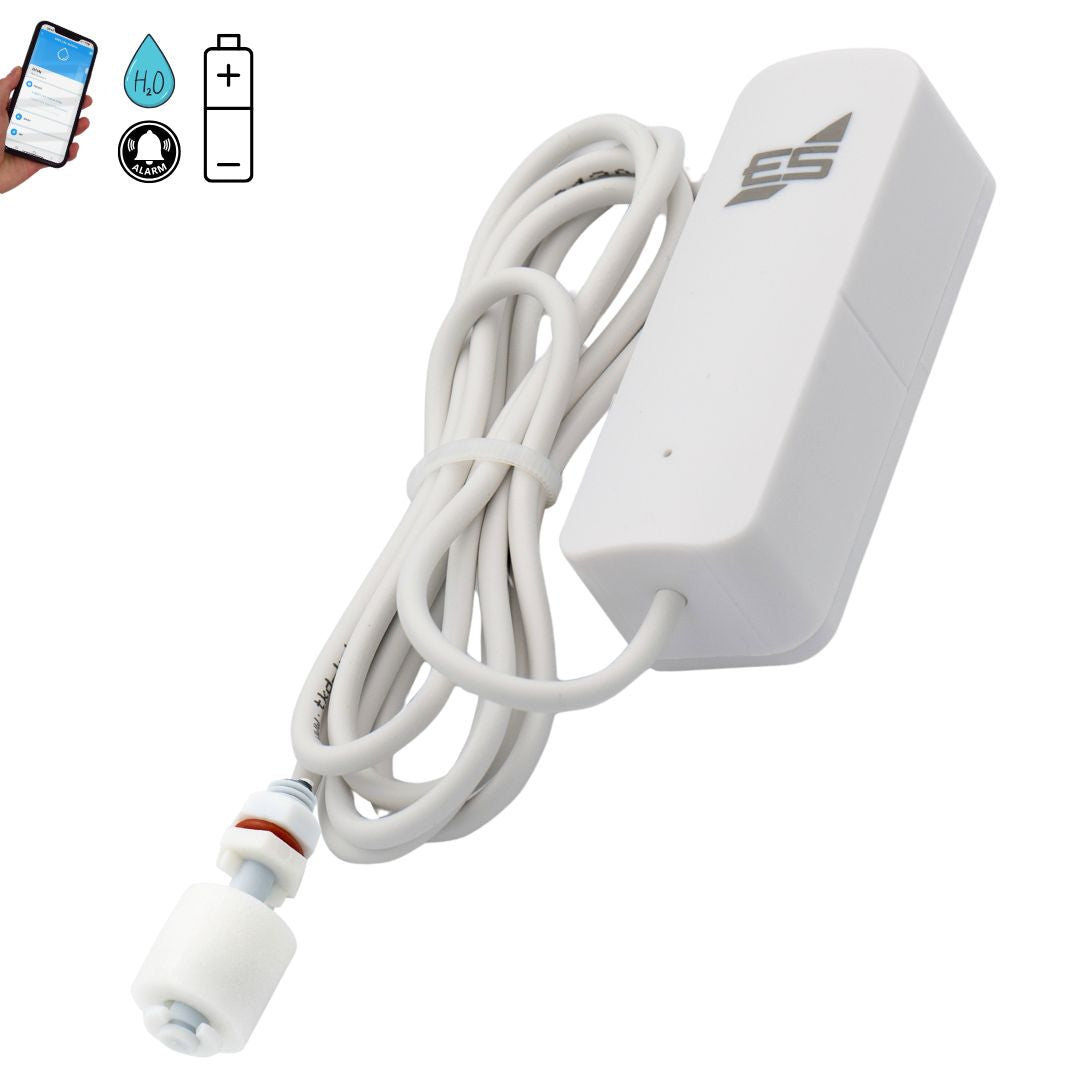
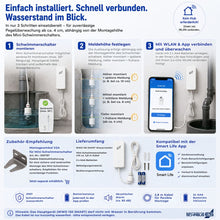
• Wassermelder WWD 150 Produktbild mit Handy
  • Wassermelder WWD 150 Videoclip
  • Wassermelder WWD 150 Produktbild mit Handy
  • WWD 150 SMART Wassermelder Batteriebetrieben Minischwimmer
  • Wassermelder WWD 150 Videoclip
  • WWD 150 SMART Wassermelder Batteriebetrieben Minischwimmer
  • WWD 150 SMART Wassermelder Batteriebetrieben Minischwimmer
  • WWD 150 SMART Wassermelder Batteriebetrieben Minischwimmer

WWD 150 SMART Wassermelder Batteriebetrieben Minischwimmer

WWD 150 SMART Wassermelder Batteriebetrieben Minischwimmer

Normal price 85,50 €
Normal price Selling price 85,50 €
Sale Sold out
including VAT plus Versandkosten
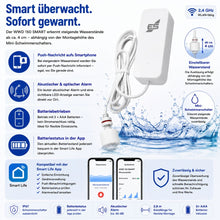
  • Mobile use: Can be placed flexibly without fixed installation.
  • Early warning: Detects water levels from 4 cm, adjustable depending on installation.
  • Smart app integration: Push notifications directly to your smartphone. 2.4 GHz Wi-Fi required for setup on your phone.
  • Battery operation: 2 × AAA batteries for easy handling.Recommendation:Lithium batteries 2 AA with Type C USB port
  • High-quality mini float switch: Precise, durable and flexibly adjustable.
  • Cable safety: LIYY cables are temporarily waterproof, flame retardant and resistant to oils/greases.
  • Easy assembly: Quick installation with included mounting material and optional mounting bracket(Article 300787).
  • Discounts for specialist companies & resellers
  • Personal expert advice (no call center!)
  • Repair service beyond the statutory warranty

Item number: 200150

Delivery time: 2-3 working days

View full details
Wassermelder WWD 150 Produktbild mit Handy

WWD 150 SMART Wassermelder Batteriebetrieben Minischwimmer

85,50 €
  • Description
  • Technical information
  • Downloads
  • FAQ - Frequently asked questions
  • Reviews

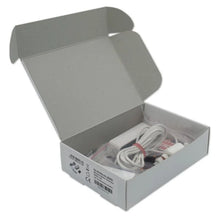
📦 Scope of delivery

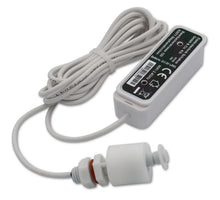
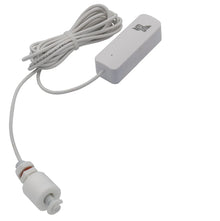
  • WWD 150 Wireless Water Detector with mini float switch

  • Mounting material

  • 2 × AAA batteries

  • Instructions for use

🧩 Product description

The WWD 150 Wireless Water Detector is a mobile, battery-operated water detector that reliably protects against rising water levels. Equipped with a high-quality mini float switch from SCHABUS, it detects water levels as low as 4 cm and sends instant push notifications to your smartphone.

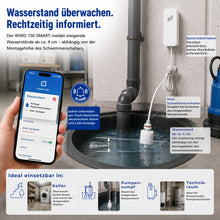
The mounting height of the float switch determines at which point the device triggers a warning. Therefore, place the mini float switch at the height at which you want to receive a warning or information.

The mini float switch should be mounted as vertically as possible (max. 30° inclination angle). To attach the mini float switch, we recommend ordering the mounting bracket (item 300787) at the same time.

As a mobile battery-powered device, the WWD 150 offers flexible deployment options: it can be set up anywhere or placed in sensitive locations without complicated cabling. The device itself should not come into contact with water .

The LIYY cable is only temporarily waterproof , flame-retardant, low-adhesion, self-extinguishing and largely resistant to oils, greases, coolants and lubricants.

📡the Smart-Live – Smart-living app

📱 App download

SCHABUS recommendation:

For continuous operation, use modern 2 AA lithium batteries, which can be recharged directly using your phone's Type-C USB port. This not only saves money in the long run, but these batteries also offer clearer performance characteristics. While the performance of regular batteries continually decreases, no longer guaranteeing reliable alarm triggering, lithium batteries maintain full power until completely discharged.

Battery performance chart | Lithium batteries

Example image

WEEE NO.: DE91394868

Operating voltage Battery operated AAA 1.5 V x 2
Alarm acoustic, optical, push message
Advertisement LED, push notification
Weight 0.07 kg
Line 1.4 m
Humidity 95% RH
Assembly Wall mounting
Control voltage Control voltage
Electricity = 150mA alarm current, = 5uA static
Temperature -10° to +50°C
Wifi 802.11 b/g/n

💧 How will I be informed about rising water levels? The WWD 150 sends push messages via the Smart app and also activates an LED warning display on the device.

🔋 Which batteries are recommended? Operation with the included 2 × AAA batteries is possible. Schabus recommends modern for longer continuous operation Lithium batteries, as they keep the voltage constant until discharge.

📲 Which app is needed? Use the free Smart appTo receive push notifications and monitor the water detector, including battery level.

🏠 Where can the WWD 150 be used? Ideal for Households, cellars, technical rooms or other critical areas where water can cause damage.

🛠️ How is the WWD 150 mounted? The WWD 150 is a mobile, standalone device: easy to set up or place on floors. The Mounting height of the mini float switch determines when the push notification is triggered. No hard wiring required. For secure attachment we recommend the Mounting bracket (item 300787). The mini float switch should be mounted vertically if possible (max. 30° tilt angle)

📶 Is a Wi-Fi connection required? Yes, for setting up the app and of course for push notifications to the smartphone, the WWD 150 works on batteries and communicates via the smart app.

⚡ How can I check the battery level? The current battery level can be directly in the smart app read so that you can get a replacement in good time.

🔌 Can the cable be in constant contact with water? No, the LIYY cable is only waterproof for a short time. It should be dried again as quickly as possible. It is flame-retardant, low-adhesion, self-extinguishing and largely resistant to oils, fats, coolants and lubricants.

🔌Can I extend the cable to the sensor?

Yes, the control line to the sensor can be set to maximum 20 meters be extended. We will manufacture the WWD 150 to your desired length, simply specify this length when ordering. You can order the appropriate cable here: Artikelnummer: 300780

Checklist for installation problems:

  • Netzwerkprobleme:
    Überlasteter Router: Wenn zu viele Geräte gleichzeitig mit dem Router verbunden sind, kann es zu Problemen kommen. Trennen Sie einige Geräte vorübergehend, um den Router zu entlasten. Router-Einstellungen: Überprüfen Sie, ob Ihr Router 2,4 GHz unterstützt, da viele Smart-
    Home-Geräte diesen Frequenzbereich benötigen. Router-Name und Passwort: Stellen Sie sicher, dass der WLAN-Name (SSID) und das Passwort korrekt eingegeben wurden. Router-Reichweite: Stellen Sie sicher, dass sich das Gerät in Reichweite des Routers befindet.
  • Geräteprobleme:
    Reset: Setzen Sie das Gerät auf die Werkseinstellungen zurück. Wie das geht, hängt vom Gerät ab, aber oft ist es ein längeres
    Drücken einer Reset-Taste oder ein Einund Ausschalten in bestimmten Intervallen (z.B. dreimal ein- und ausschalten). Firmware-Update: Überprüfen Sie, ob für das Gerät ein Firmware-Update verfügbar ist und installieren Sie es.
  • App-Probleme:
    App-Version: Stellen Sie sicher, dass Sie die neueste Version der Tuya Smart App verwenden. App-Berechtigungen: Überprüfen Sie, ob die App die erforderlichen Berechtigungen für den Zugriff auf das WLAN und den Standort hat. App-Cache leeren: Löschen Sie den Cache der App in den Einstellungen Ihres Smartphones. App neu installieren: Wenn alles andere fehlschlägt, versuchen Sie, die App zu deinstallieren und erneut zu installieren.
  • Verbindungsprozess:
    Blinken des Geräts: Achten Sie darauf, dass das Gerät während der Verbindung blinkt, was den Netzwerk-Verbindungsmodus anzeigt.
    Warten Sie 10 Sekunden, um zu bestätigen, dass das Gerät blinkt, bevor Sie fortfahren. Gerät hinzufügen: In der App gehen Sie auf "Gerät hinzufügen" oder das Plus-Symbol, wählen die passende Gerätekategorie und den WLAN-Typ aus.

Customer Reviews

Be the first to write a review
0%
(0)
0%
(0)
0%
(0)
0%
(0)
0%
(0)
Description

📦 Scope of delivery

  • WWD 150 Wireless Water Detector with mini float switch

  • Mounting material

  • 2 × AAA batteries

  • Instructions for use

🧩 Product description

The WWD 150 Wireless Water Detector is a mobile, battery-operated water detector that reliably protects against rising water levels. Equipped with a high-quality mini float switch from SCHABUS, it detects water levels as low as 4 cm and sends instant push notifications to your smartphone.

The mounting height of the float switch determines at which point the device triggers a warning. Therefore, place the mini float switch at the height at which you want to receive a warning or information.

The mini float switch should be mounted as vertically as possible (max. 30° inclination angle). To attach the mini float switch, we recommend ordering the mounting bracket (item 300787) at the same time.

As a mobile battery-powered device, the WWD 150 offers flexible deployment options: it can be set up anywhere or placed in sensitive locations without complicated cabling. The device itself should not come into contact with water .

The LIYY cable is only temporarily waterproof , flame-retardant, low-adhesion, self-extinguishing and largely resistant to oils, greases, coolants and lubricants.

📡the Smart-Live – Smart-living app

📱 App download

SCHABUS recommendation:

For continuous operation, use modern 2 AA lithium batteries, which can be recharged directly using your phone's Type-C USB port. This not only saves money in the long run, but these batteries also offer clearer performance characteristics. While the performance of regular batteries continually decreases, no longer guaranteeing reliable alarm triggering, lithium batteries maintain full power until completely discharged.

Battery performance chart | Lithium batteries

Example image

WEEE NO.: DE91394868

Technical information
Operating voltage Battery operated AAA 1.5 V x 2
Alarm acoustic, optical, push message
Advertisement LED, push notification
Weight 0.07 kg
Line 1.4 m
Humidity 95% RH
Assembly Wall mounting
Control voltage Control voltage
Electricity = 150mA alarm current, = 5uA static
Temperature -10° to +50°C
Wifi 802.11 b/g/n
Connection examples
FAQ - Frequently asked questions

💧 How will I be informed about rising water levels? The WWD 150 sends push messages via the Smart app and also activates an LED warning display on the device.

🔋 Which batteries are recommended? Operation with the included 2 × AAA batteries is possible. Schabus recommends modern for longer continuous operation Lithium batteries, as they keep the voltage constant until discharge.

📲 Which app is needed? Use the free Smart appTo receive push notifications and monitor the water detector, including battery level.

🏠 Where can the WWD 150 be used? Ideal for Households, cellars, technical rooms or other critical areas where water can cause damage.

🛠️ How is the WWD 150 mounted? The WWD 150 is a mobile, standalone device: easy to set up or place on floors. The Mounting height of the mini float switch determines when the push notification is triggered. No hard wiring required. For secure attachment we recommend the Mounting bracket (item 300787). The mini float switch should be mounted vertically if possible (max. 30° tilt angle)

📶 Is a Wi-Fi connection required? Yes, for setting up the app and of course for push notifications to the smartphone, the WWD 150 works on batteries and communicates via the smart app.

⚡ How can I check the battery level? The current battery level can be directly in the smart app read so that you can get a replacement in good time.

🔌 Can the cable be in constant contact with water? No, the LIYY cable is only waterproof for a short time. It should be dried again as quickly as possible. It is flame-retardant, low-adhesion, self-extinguishing and largely resistant to oils, fats, coolants and lubricants.

🔌Can I extend the cable to the sensor?

Yes, the control line to the sensor can be set to maximum 20 meters be extended. We will manufacture the WWD 150 to your desired length, simply specify this length when ordering. You can order the appropriate cable here: Artikelnummer: 300780

Checklist for installation problems:

  • Netzwerkprobleme:
    Überlasteter Router: Wenn zu viele Geräte gleichzeitig mit dem Router verbunden sind, kann es zu Problemen kommen. Trennen Sie einige Geräte vorübergehend, um den Router zu entlasten. Router-Einstellungen: Überprüfen Sie, ob Ihr Router 2,4 GHz unterstützt, da viele Smart-
    Home-Geräte diesen Frequenzbereich benötigen. Router-Name und Passwort: Stellen Sie sicher, dass der WLAN-Name (SSID) und das Passwort korrekt eingegeben wurden. Router-Reichweite: Stellen Sie sicher, dass sich das Gerät in Reichweite des Routers befindet.
  • Geräteprobleme:
    Reset: Setzen Sie das Gerät auf die Werkseinstellungen zurück. Wie das geht, hängt vom Gerät ab, aber oft ist es ein längeres
    Drücken einer Reset-Taste oder ein Einund Ausschalten in bestimmten Intervallen (z.B. dreimal ein- und ausschalten). Firmware-Update: Überprüfen Sie, ob für das Gerät ein Firmware-Update verfügbar ist und installieren Sie es.
  • App-Probleme:
    App-Version: Stellen Sie sicher, dass Sie die neueste Version der Tuya Smart App verwenden. App-Berechtigungen: Überprüfen Sie, ob die App die erforderlichen Berechtigungen für den Zugriff auf das WLAN und den Standort hat. App-Cache leeren: Löschen Sie den Cache der App in den Einstellungen Ihres Smartphones. App neu installieren: Wenn alles andere fehlschlägt, versuchen Sie, die App zu deinstallieren und erneut zu installieren.
  • Verbindungsprozess:
    Blinken des Geräts: Achten Sie darauf, dass das Gerät während der Verbindung blinkt, was den Netzwerk-Verbindungsmodus anzeigt.
    Warten Sie 10 Sekunden, um zu bestätigen, dass das Gerät blinkt, bevor Sie fortfahren. Gerät hinzufügen: In der App gehen Sie auf "Gerät hinzufügen" oder das Plus-Symbol, wählen die passende Gerätekategorie und den WLAN-Typ aus.

Reviews

Customer Reviews

Be the first to write a review
0%
(0)
0%
(0)
0%
(0)
0%
(0)
0%
(0)