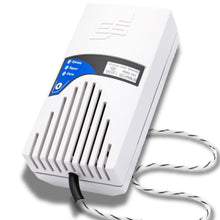
• Wassermelder SHT 450 AufzĂ€hlungspunkte
  • Wassermelder WWD450 ErklĂ€rvideo
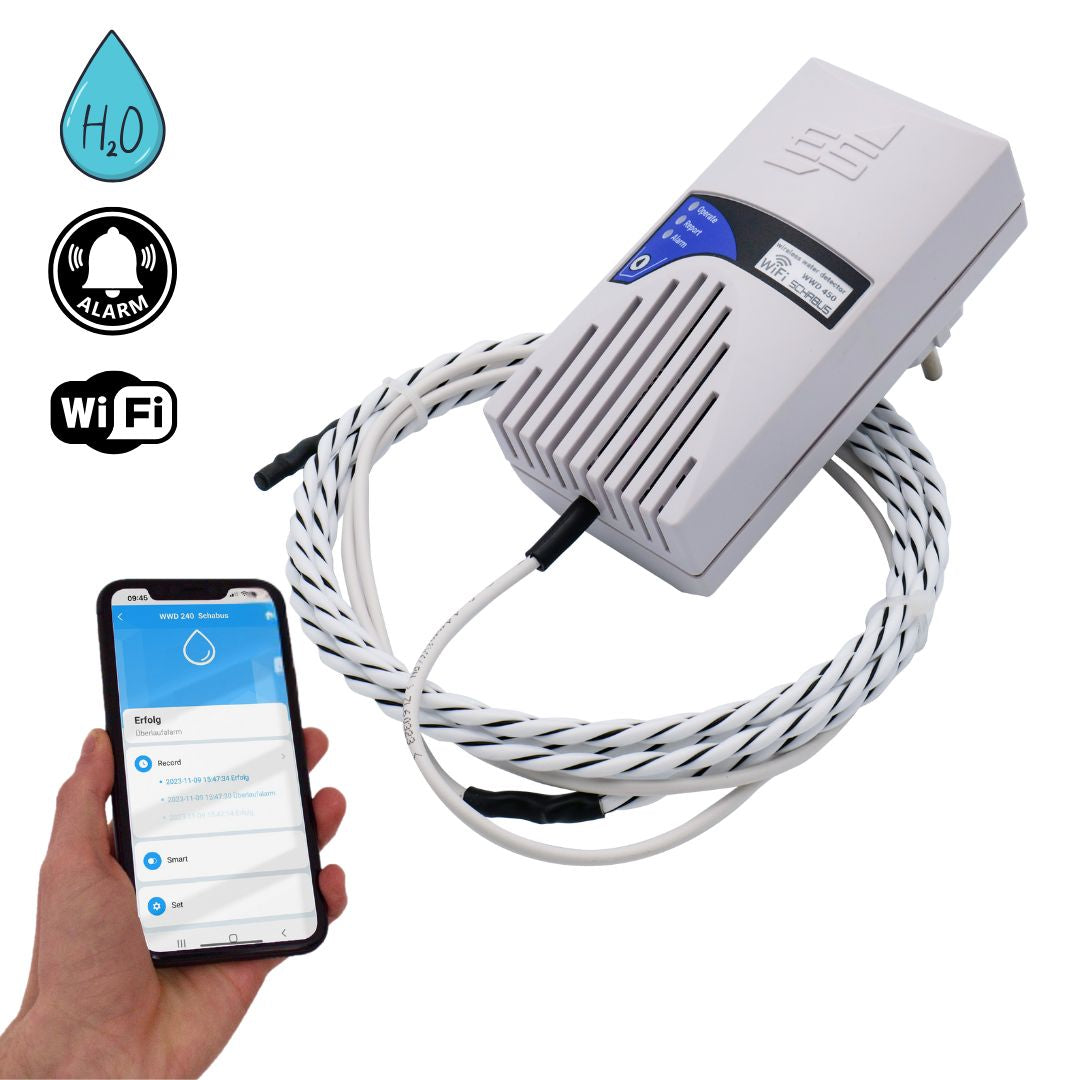
  • WWD 450 Smart Water Detector with Sensor Cable 230 VAC/50Hz/Schuko Plug
  • Wassermelder SHT 450 AufzĂ€hlungspunkte
  • Wassermelder WWD450 ErklĂ€rvideo
  • WWD 450 Smart Water Detector with Sensor Cable 230 VAC/50Hz/Schuko Plug
  • WWD 450 Smart Water Detector with Sensor Cable 230 VAC/50Hz/Schuko Plug
  • WWD 450 Smart Water Detector with Sensor Cable 230 VAC/50Hz/Schuko Plug
  • WWD 450 Smart Water Detector with Sensor Cable 230 VAC/50Hz/Schuko Plug
  • WWD 450 Smart Water Detector with Sensor Cable 230 VAC/50Hz/Schuko Plug
  • WWD 450 Smart Water Detector with Sensor Cable 230 VAC/50Hz/Schuko Plug

WWD 450 Smart Water Detector with Sensor Cable 230 VAC/50Hz/Schuko Plug

WWD 450 Smart Water Detector with Sensor Cable 230 VAC/50Hz/Schuko Plug

Normal price 169,00 €
Normal price Selling price 169,00 €
Sale Sold out
including VAT plus Versandkosten
  • Easy installation (230 V socket device)
  • 1 m LIYY cable on the water detector (extendable on request), sensor cable in connection
  • Water sensor with cable length 2 m (extendable on request, max. 1500 meters), easy to lay on the ground
  • acoustic and visual warning directly on the device
  • Push notification to your mobile phone, simply install it for free on the Smart-Life - Smart-Living-APP
  • For laying under kitchen and bathroom furniture, under aquariums, anywhere where water can leak out
  • dries quickly - ready for use again immediately
  • LIYY cables are temporarily waterproof, flame-retardant, low-adhesion, self-extinguishing and largely resistant to oils, greases, coolants and lubricants (manufacturer information)
  • Discounts for specialist companies & resellers
  • Personal expert advice (no call center!)
  • Repair service beyond the statutory warranty

Item number: 500450

Delivery time: 2-3 working days

View full details
WWD 450 Smart Water Detector with Sensor Cable 230 VAC/50Hz/Schuko Plug

WWD 450 Smart Water Detector with Sensor Cable 230 VAC/50Hz/Schuko Plug

169,00 €
  • Description
  • Technical information
  • Downloads
  • FAQ - Frequently asked questions
  • Reviews

📩 Scope of delivery

  • Water detector WWD 450 with sensor cable

  • LIYY control cable 1 m + black and white striped sensor cable 2 m (extendable)

  • Operating instructions


💧 Early warning system against water damage – the WWD 450 with sensor cable

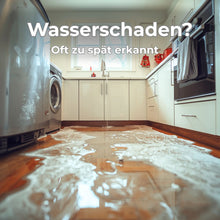
A burst hose, a dripping valve, or water seeping into the basement – ​​even the smallest amounts can cause major damage.
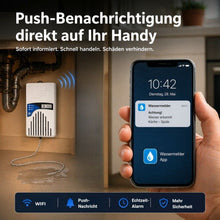
The WWD 450 plug-in water detector is the reliable solution: Its sensor cable detects even thin films of water or puddles on the floor. As soon as water is detected, the device triggers a loud audible alarm , the LED flashes red, and you also receive a push notification on your smartphone .

After the sensor cable has dried (approx. 15 seconds), the device automatically resets and the display lights up green again.


⚙ Quickly installed – ready to use

Commissioning is extremely simple:

  • Plug the WWD 450 into a power outlet

  • Lay the sensor cable (LIYY control cable 1 m + black and white striped sensor cable 2 m) near the ground

  • Connect with the free Smart Life app

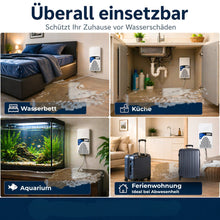
Typical locations are:

  • Basement rooms đŸ§±
  • Laundry rooms đŸ§ș
  • Boiler rooms đŸ”„
  • Kitchens and bathrooms (under built-in furniture) 🍳🛁
  • Aquariums 🐠
  • Holiday apartments 🏡

Thanks to the sensor cable, the WWD 450 can detect large areas of water and detect water at an early stage.


✅ The advantages at a glance

  • 🔌 Simply plug in and start – plug-and-play without specialist installation

  • 💧 Sensor cable for area water detection (1 m LIYY control cable + 2 m black and white striped cable)

  • 📱 Acoustic alarm (approx. 85 dB) + optical LED warning

  • đŸ“± Real-time push notifications via Smart Life app

  • 📏 Both cables can be extended up to 50 m on request

  • đŸ›Ąïž Ideal for interiors with a risk of moisture


🚀 Features & App Benefits

  • đŸ“Č Push notification in case of alarm – immediate warning, no matter where you are

  • 🌐 Compatible with Smart Life app (Android & iOS, free)

  • 🔄 Automatic reset after the sensor cable has dried

  • 👹🔧 Easy retrofitting – can also be installed later

  • 🔔 On-site visual alarm indication – flashing LED in addition to the signal tone


⚠ Instructions for use

  • The WWD 450 is designed for use in regularly dry areas (e.g. under built-in furniture in kitchens, bathrooms, laundry rooms, utility rooms, aquariums, basement areas).

  • The sensor cable is not suitable for permanently submerged applications .

  • The LIYY control cable and the sensor cable are temporarily waterproof , flame-retardant, self-extinguishing and resistant to oils, greases and coolants – they should be dried after contact with water.

  • Safety rule: Sensor cables must not be laid parallel to 230 V lines .


đŸ§Ÿ Technical data

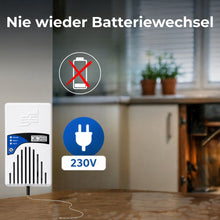
  • Operating voltage: 230 V AC / 50 Hz

  • Socket device with Schuko plug

  • Alarm: approx. 85 dB

  • Sensor cable: 1 m LIYY control cable + 2 m black and white striped cable (extendable up to 50 m)

  • App connection: Smart Life – Smart Living (Wi-Fi 2.4 GHz required)

A 1-meter-long LIYY cable is installed from the WWD450 warning device to the sensor cable (black and white striped). Both the LIYY cable and the sensor cable can be extended upon request.

⚠ Notes on cable routing and surroundings

  • The LIYY control cables are only temporarily waterproof and according to the manufacturer:
    → flame-retardant , self-extinguishing , low-adhesion
    → largely resistant to oils, greases, coolants and lubricants

  • Not suitable for permanent water contact or outdoor use without protection .

  • The cables must never be laid parallel to 230 V cables to avoid interference and safety risks .

📡the Smart-Live – Smart-living app

đŸ“± App download

WEEE NO.: DE91394868

Operating voltage 230V ~ (+/-10%)V AC / 50-60Hz
Functional area -15°C / +40°C
Protection class IP20
Dimensions(WxWxD)

118x60x44mm

Power consumption 0.8 W, in standby
Weight 0.28 kg
Line 1 meter, LIYY cable, extendable
Sound pressure level 90 dB (10 cm distance)
Sensor 2 meters, extendable, 2*30 AWG, conductive fluoropolymer sheath, max. 1500 m, drying time approx. 15 seconds
Wifi 802.11 b/g/n

1. 🔌 Does the WWD 450 need to be permanently installed? No - it is simply plugged into a socket and is ready to use straight away.

2. đŸ“± Is the app really free? Yes – the Smart Life app (Smart Life – Smart Living) is available free of charge for Android and iOS.

3. 💧 What is the advantage of the sensor cable? The sensor cable detects thin films of water or large puddles, ideal for rooms where water spreads slowly. The sensor cable should be laid so that it is accessible at all times - in order to remove any water leaks or damaged cables.

4. 🔊 How loud is the alarm? At around 85 dB, it is loud enough to alert adjoining rooms or neighboring floors.

5. 📏 Can I extend the sensor cable? Yes - the 1 m LIYY control line and the 2 m coiled cable can be extended up to 50 m. Pre-assembled special lengths are available upon request.

6. 🌐 Which Wi-Fi network is needed? A 2.4GHz WiFi network – 5GHz is not supported.

7. 🏠 Where is the best place to deploy it? Anywhere where water could leak over a large area: basement rooms, laundry rooms, boiler rooms, technical rooms or holiday apartments.

Checklist for installation problems:

  • Netzwerkprobleme:
    Überlasteter Router: Wenn zu viele GerĂ€te gleichzeitig mit dem Router verbunden sind, kann es zu Problemen kommen. Trennen Sie einige GerĂ€te vorĂŒbergehend, um den Router zu entlasten. Router-Einstellungen: ÜberprĂŒfen Sie, ob Ihr Router 2,4 GHz unterstĂŒtzt, da viele Smart-
    Home-GerÀte diesen Frequenzbereich benötigen. Router-Name und Passwort: Stellen Sie sicher, dass der WLAN-Name (SSID) und das Passwort korrekt eingegeben wurden. Router-Reichweite: Stellen Sie sicher, dass sich das GerÀt in Reichweite des Routers befindet.
  • GerĂ€teprobleme:
    Reset: Setzen Sie das GerĂ€t auf die Werkseinstellungen zurĂŒck. Wie das geht, hĂ€ngt vom GerĂ€t ab, aber oft ist es ein lĂ€ngeres
    DrĂŒcken einer Reset-Taste oder ein Einund Ausschalten in bestimmten Intervallen (z.B. dreimal ein- und ausschalten). Firmware-Update: ÜberprĂŒfen Sie, ob fĂŒr das GerĂ€t ein Firmware-Update verfĂŒgbar ist und installieren Sie es.
  • App-Probleme:
    App-Version: Stellen Sie sicher, dass Sie die neueste Version der Tuya Smart App verwenden. App-Berechtigungen: ÜberprĂŒfen Sie, ob die App die erforderlichen Berechtigungen fĂŒr den Zugriff auf das WLAN und den Standort hat. App-Cache leeren: Löschen Sie den Cache der App in den Einstellungen Ihres Smartphones. App neu installieren: Wenn alles andere fehlschlĂ€gt, versuchen Sie, die App zu deinstallieren und erneut zu installieren.
  • Verbindungsprozess:
    Blinken des GerÀts: Achten Sie darauf, dass das GerÀt wÀhrend der Verbindung blinkt, was den Netzwerk-Verbindungsmodus anzeigt.
    Warten Sie 10 Sekunden, um zu bestĂ€tigen, dass das GerĂ€t blinkt, bevor Sie fortfahren. GerĂ€t hinzufĂŒgen: In der App gehen Sie auf "GerĂ€t hinzufĂŒgen" oder das Plus-Symbol, wĂ€hlen die passende GerĂ€tekategorie und den WLAN-Typ aus.

Customer Reviews

Based on 1 review
100%
(1)
0%
(0)
0%
(0)
0%
(0)
0%
(0)
A
Anonymous

Everything was great! Very good equipment!

Description

📩 Scope of delivery

  • Water detector WWD 450 with sensor cable

  • LIYY control cable 1 m + black and white striped sensor cable 2 m (extendable)

  • Operating instructions


💧 Early warning system against water damage – the WWD 450 with sensor cable

A burst hose, a dripping valve, or water seeping into the basement – ​​even the smallest amounts can cause major damage.
The WWD 450 plug-in water detector is the reliable solution: Its sensor cable detects even thin films of water or puddles on the floor. As soon as water is detected, the device triggers a loud audible alarm , the LED flashes red, and you also receive a push notification on your smartphone .

After the sensor cable has dried (approx. 15 seconds), the device automatically resets and the display lights up green again.


⚙ Quickly installed – ready to use

Commissioning is extremely simple:

  • Plug the WWD 450 into a power outlet

  • Lay the sensor cable (LIYY control cable 1 m + black and white striped sensor cable 2 m) near the ground

  • Connect with the free Smart Life app

Typical locations are:

  • Basement rooms đŸ§±
  • Laundry rooms đŸ§ș
  • Boiler rooms đŸ”„
  • Kitchens and bathrooms (under built-in furniture) 🍳🛁
  • Aquariums 🐠
  • Holiday apartments 🏡

Thanks to the sensor cable, the WWD 450 can detect large areas of water and detect water at an early stage.


✅ The advantages at a glance

  • 🔌 Simply plug in and start – plug-and-play without specialist installation

  • 💧 Sensor cable for area water detection (1 m LIYY control cable + 2 m black and white striped cable)

  • 📱 Acoustic alarm (approx. 85 dB) + optical LED warning

  • đŸ“± Real-time push notifications via Smart Life app

  • 📏 Both cables can be extended up to 50 m on request

  • đŸ›Ąïž Ideal for interiors with a risk of moisture


🚀 Features & App Benefits

  • đŸ“Č Push notification in case of alarm – immediate warning, no matter where you are

  • 🌐 Compatible with Smart Life app (Android & iOS, free)

  • 🔄 Automatic reset after the sensor cable has dried

  • 👹🔧 Easy retrofitting – can also be installed later

  • 🔔 On-site visual alarm indication – flashing LED in addition to the signal tone


⚠ Instructions for use

  • The WWD 450 is designed for use in regularly dry areas (e.g. under built-in furniture in kitchens, bathrooms, laundry rooms, utility rooms, aquariums, basement areas).

  • The sensor cable is not suitable for permanently submerged applications .

  • The LIYY control cable and the sensor cable are temporarily waterproof , flame-retardant, self-extinguishing and resistant to oils, greases and coolants – they should be dried after contact with water.

  • Safety rule: Sensor cables must not be laid parallel to 230 V lines .


đŸ§Ÿ Technical data

  • Operating voltage: 230 V AC / 50 Hz

  • Socket device with Schuko plug

  • Alarm: approx. 85 dB

  • Sensor cable: 1 m LIYY control cable + 2 m black and white striped cable (extendable up to 50 m)

  • App connection: Smart Life – Smart Living (Wi-Fi 2.4 GHz required)

A 1-meter-long LIYY cable is installed from the WWD450 warning device to the sensor cable (black and white striped). Both the LIYY cable and the sensor cable can be extended upon request.

⚠ Notes on cable routing and surroundings

  • The LIYY control cables are only temporarily waterproof and according to the manufacturer:
    → flame-retardant , self-extinguishing , low-adhesion
    → largely resistant to oils, greases, coolants and lubricants

  • Not suitable for permanent water contact or outdoor use without protection .

  • The cables must never be laid parallel to 230 V cables to avoid interference and safety risks .

📡the Smart-Live – Smart-living app

đŸ“± App download

WEEE NO.: DE91394868

Technical information
Operating voltage 230V ~ (+/-10%)V AC / 50-60Hz
Functional area -15°C / +40°C
Protection class IP20
Dimensions(WxWxD)

118x60x44mm

Power consumption 0.8 W, in standby
Weight 0.28 kg
Line 1 meter, LIYY cable, extendable
Sound pressure level 90 dB (10 cm distance)
Sensor 2 meters, extendable, 2*30 AWG, conductive fluoropolymer sheath, max. 1500 m, drying time approx. 15 seconds
Wifi 802.11 b/g/n
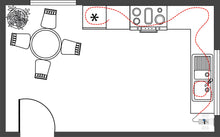
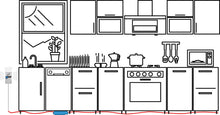
Connection examples
FAQ - Frequently asked questions

1. 🔌 Does the WWD 450 need to be permanently installed? No - it is simply plugged into a socket and is ready to use straight away.

2. đŸ“± Is the app really free? Yes – the Smart Life app (Smart Life – Smart Living) is available free of charge for Android and iOS.

3. 💧 What is the advantage of the sensor cable? The sensor cable detects thin films of water or large puddles, ideal for rooms where water spreads slowly. The sensor cable should be laid so that it is accessible at all times - in order to remove any water leaks or damaged cables.

4. 🔊 How loud is the alarm? At around 85 dB, it is loud enough to alert adjoining rooms or neighboring floors.

5. 📏 Can I extend the sensor cable? Yes - the 1 m LIYY control line and the 2 m coiled cable can be extended up to 50 m. Pre-assembled special lengths are available upon request.

6. 🌐 Which Wi-Fi network is needed? A 2.4GHz WiFi network – 5GHz is not supported.

7. 🏠 Where is the best place to deploy it? Anywhere where water could leak over a large area: basement rooms, laundry rooms, boiler rooms, technical rooms or holiday apartments.

Checklist for installation problems:

  • Netzwerkprobleme:
    Überlasteter Router: Wenn zu viele GerĂ€te gleichzeitig mit dem Router verbunden sind, kann es zu Problemen kommen. Trennen Sie einige GerĂ€te vorĂŒbergehend, um den Router zu entlasten. Router-Einstellungen: ÜberprĂŒfen Sie, ob Ihr Router 2,4 GHz unterstĂŒtzt, da viele Smart-
    Home-GerÀte diesen Frequenzbereich benötigen. Router-Name und Passwort: Stellen Sie sicher, dass der WLAN-Name (SSID) und das Passwort korrekt eingegeben wurden. Router-Reichweite: Stellen Sie sicher, dass sich das GerÀt in Reichweite des Routers befindet.
  • GerĂ€teprobleme:
    Reset: Setzen Sie das GerĂ€t auf die Werkseinstellungen zurĂŒck. Wie das geht, hĂ€ngt vom GerĂ€t ab, aber oft ist es ein lĂ€ngeres
    DrĂŒcken einer Reset-Taste oder ein Einund Ausschalten in bestimmten Intervallen (z.B. dreimal ein- und ausschalten). Firmware-Update: ÜberprĂŒfen Sie, ob fĂŒr das GerĂ€t ein Firmware-Update verfĂŒgbar ist und installieren Sie es.
  • App-Probleme:
    App-Version: Stellen Sie sicher, dass Sie die neueste Version der Tuya Smart App verwenden. App-Berechtigungen: ÜberprĂŒfen Sie, ob die App die erforderlichen Berechtigungen fĂŒr den Zugriff auf das WLAN und den Standort hat. App-Cache leeren: Löschen Sie den Cache der App in den Einstellungen Ihres Smartphones. App neu installieren: Wenn alles andere fehlschlĂ€gt, versuchen Sie, die App zu deinstallieren und erneut zu installieren.
  • Verbindungsprozess:
    Blinken des GerÀts: Achten Sie darauf, dass das GerÀt wÀhrend der Verbindung blinkt, was den Netzwerk-Verbindungsmodus anzeigt.
    Warten Sie 10 Sekunden, um zu bestĂ€tigen, dass das GerĂ€t blinkt, bevor Sie fortfahren. GerĂ€t hinzufĂŒgen: In der App gehen Sie auf "GerĂ€t hinzufĂŒgen" oder das Plus-Symbol, wĂ€hlen die passende GerĂ€tekategorie und den WLAN-Typ aus.

Reviews

Customer Reviews

Based on 1 review
100%
(1)
0%
(0)
0%
(0)
0%
(0)
0%
(0)
A
Anonymous

Everything was great! Very good equipment!