• Wassermelder WWD 241 Aufzählungspunkte
  • Wassermelder WWD 241 Anwendungsbild
  • WWD 241 Smart Water Detector Mini Float 230 VAC/50Hz/Schuko Plug
  • Wassermelder WWD 241 Aufzählungspunkte
  • Wassermelder WWD 241 Anwendungsbild
  • WWD 241 Smart Water Detector Mini Float 230 VAC/50Hz/Schuko Plug
  • WWD 241 Smart Water Detector Mini Float 230 VAC/50Hz/Schuko Plug

WWD 241 Smart Water Detector Mini Float 230 VAC/50Hz/Schuko Plug

WWD 241 Smart Water Detector Mini Float 230 VAC/50Hz/Schuko Plug

Normal price 179,00 €
Normal price Selling price 179,00 €
Sale Sold out
including VAT plus Versandkosten
  • Easy installation (230 V socket device)
  • Acoustic and visual alarm message
  • Also suitable for other liquids (e.g. heating oil, diesel, vegetable oil, lubricating oils, etc.)
  • Float switch with 2.5 m cable (extendable)
  • Install for free on the Smart-Life - Smart-Living-APP
  • Particularly suitable for dirty water or other liquids (e.g. heating oil, diesel, vegetable oil, lubricating oil, etc.)
  • Discounts for specialist companies & resellers
  • Personal expert advice (no call center!)
  • Repair service beyond the statutory warranty

Item number: 500241

Delivery time: 2-3 working days

View full details
WWD 241 Smart Water Detector Mini Float 230 VAC/50Hz/Schuko Plug

WWD 241 Smart Water Detector Mini Float 230 VAC/50Hz/Schuko Plug

179,00 €
  • Description
  • Technical information
  • Downloads
  • FAQ - Frequently asked questions
  • Reviews

📦 Scope of delivery

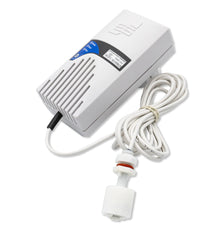
  • Water detector WWD 241 with integrated Schuko plug (230 V AC, 50 Hz)

  • Mini float switch with 2.5 m LIYY control cable (extendable)

  • Operating instructions


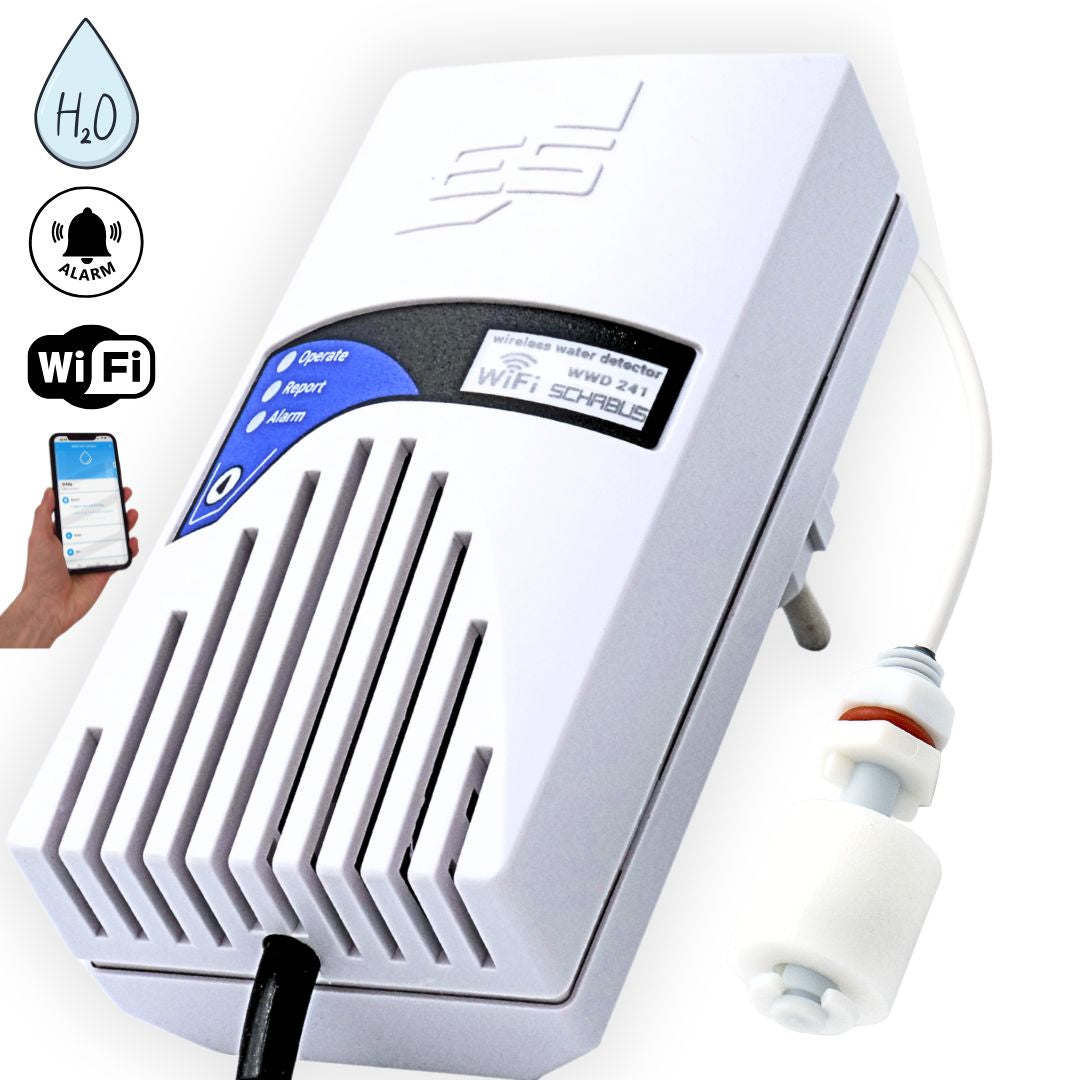
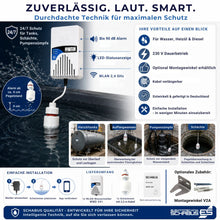
💧 Early warning system for water & more – the smart WWD 241

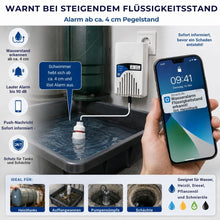
Water damage rarely goes unnoticed for long – and can quickly become expensive. With the WWD 241 Smart Water Detector, you're reliably protected: The integrated mini float switch reacts at a water level as low as approximately 4 cm. As soon as the water level is reached, a loud audible alarm sounds and the LED flashes visibly red . If the water level drops again, the signal automatically stops and the display returns to green .

What's special about the WWD 241 is that it's not only suitable for water, but also detects liquids with a density of 0.7 g/cm³ and above – including heating oil, diesel, vegetable oil, and lubricating oil . This makes it versatile in use – from heating oil tanks to drip pans.

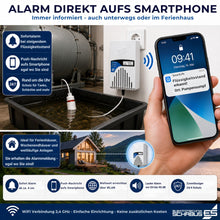
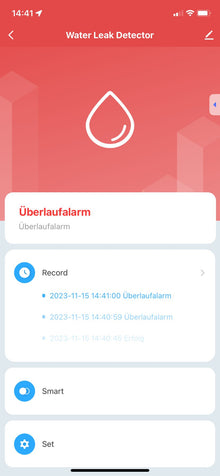
Thanks to the Smart Life app, you also receive push notifications directly on your smartphone – even when you're on the go. This way, you're always informed and can respond immediately.


🚀 Features & Benefits of the Smart Life App

  • 📱 Push notification in case of alarm – immediate warning, no matter where you are

  • 📲 Free app for Android & iOS – intuitive setup in just a few steps

  • 💡 Visual alarm indication on site – LED flashes in addition to the app message

  • 🌐 Wi-Fi connection via 2.4 GHz – stable connection for secure messages


⚙️ Easy installation – ready to use

  1. Plug the device into a free socket

  2. Position the mini float switch in the tank or near the bottom

  3. Connect to Wi-Fi & register in the Smart Life app – done ✅

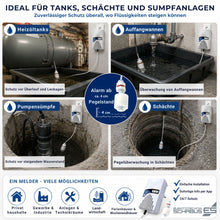
Typical locations:

  • Basement rooms with lifting system 🧱

  • Heating oil tanks & drip trays 🛢️

  • Technical rooms 🔧

  • Holiday apartments or second homes 🏡


Your benefits at a glance

  • 🔌 Plug & Play – no installation required, ready to use

  • 📢 Acoustic alarm (approx. 90 dB) – loud and reliable

  • 💡 Optical alarm signal via LED – red in case of alarm, green in case of silence

  • 📱 App integration – push alarm directly to your smartphone

  • 💧 Mini float switch for liquid levels from approx. 4 cm

  • 🛢️ Suitable for water, heating oil, diesel, lubricating & vegetable oils

  • 📏 Sensor cable 2.5 m – extendable up to 50 m


⚠️ Note on use
The WWD 241 is specifically designed for areas with liquid levels, such as tanks . Typical applications: liquid containers, drip trays, and basements with a risk of backflow or leakage .


🔧 Flexible sensor cable – even over long distances
The included cable is 2.5 m long. If necessary, the cable can be extended up to 50 m (max. cross-section 2 × 0.14 mm²).

Important:

  • The cable must be cut and connected with terminals

  • Alternatively: pre-assembled special lengths available directly from Elektrotechnik SCHABUS

⚠️ Notes on cable routing and surroundings

  • The LIYY control cables are only temporarily waterproof and according to the manufacturer:
    flame-retardant , self-extinguishing , low-adhesion
    largely resistant to oils, greases, coolants and lubricants

  • Not suitable for permanent water contact or outdoor use without protection .

  • The cables must never be laid parallel to 230 V cables to avoid interference and safety risks .

🔩 Accessory tip

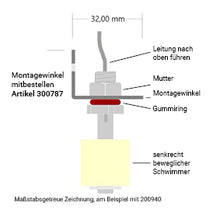
To attach the mini float switch, we recommend ordering the mounting bracket (item no. 300787) at the same time.

Alternatively, the dirt trap (item 300320) is particularly suitable for outdoor use. It is supplied with a mounting bracket and protects the mini float switch from blockages caused by leaves, small twigs or small animals in the outdoor water:

📡the Smart-Live – Smart-living app

📱 App download

WEEE NO.: DE91394868

Operating voltage 230V ~ (+/-10%)V AC / 50-60Hz
Functional area -15°C / +40°C
Protection class IP20
Dimensions(WxWxD)

118x60x44mm

Power consumption 0.8 W, in standby
Weight 0.28 kg
Line 2.5 m | 2×0.14mm2 | white, extendable
Sound pressure level 90 dB (10 cm distance), Piezo
Wifi 802.11 b/g/n

1. 🔌 Does the WWD 241 need to be permanently installed? No – he is a Plug and play socket device. Simply plug it in, position the float switch and set up the app.

2. 🛢️ Does the WWD 241 also work with liquids other than water? Yes – it also recognizes Heating oil, diesel, vegetable and lubricating oils, provided their density is at least 0.7 g/cm³ amounts.

3. 🔊 How loud is the alarm? The integrated signal generator reaches approx. 90dB at a distance of 10 cm – loud enough for adjacent rooms.

4. 📏 Can I extend the float switch? Yes – the one supplied 2.5 m cable can be up to 50 m be extended. are available upon request Special lengths available.

5. 📱 Is there an app for notifications? Yes – via the Free Smart Life app (Android) & iOS) In the event of an alarm, you will receive a Push notification directly to your smartphone.

6. 🏠 Which deployment locations are suitable? Ideal for Basement rooms with backflow risk, pump sumps, heating oil tanks, collecting trays, drainage shafts – wherever liquid levels need to be monitored.

Checklist for installation problems:

  • Netzwerkprobleme:
    Überlasteter Router: Wenn zu viele Geräte gleichzeitig mit dem Router verbunden sind, kann es zu Problemen kommen. Trennen Sie einige Geräte vorübergehend, um den Router zu entlasten. Router-Einstellungen: Überprüfen Sie, ob Ihr Router 2,4 GHz unterstützt, da viele Smart-
    Home-Geräte diesen Frequenzbereich benötigen. Router-Name und Passwort: Stellen Sie sicher, dass der WLAN-Name (SSID) und das Passwort korrekt eingegeben wurden. Router-Reichweite: Stellen Sie sicher, dass sich das Gerät in Reichweite des Routers befindet.
  • Geräteprobleme:
    Reset: Setzen Sie das Gerät auf die Werkseinstellungen zurück. Wie das geht, hängt vom Gerät ab, aber oft ist es ein längeres
    Drücken einer Reset-Taste oder ein Einund Ausschalten in bestimmten Intervallen (z.B. dreimal ein- und ausschalten). Firmware-Update: Überprüfen Sie, ob für das Gerät ein Firmware-Update verfügbar ist und installieren Sie es.
  • App-Probleme:
    App-Version: Stellen Sie sicher, dass Sie die neueste Version der Tuya Smart App verwenden. App-Berechtigungen: Überprüfen Sie, ob die App die erforderlichen Berechtigungen für den Zugriff auf das WLAN und den Standort hat. App-Cache leeren: Löschen Sie den Cache der App in den Einstellungen Ihres Smartphones. App neu installieren: Wenn alles andere fehlschlägt, versuchen Sie, die App zu deinstallieren und erneut zu installieren.
  • Verbindungsprozess:
    Blinken des Geräts: Achten Sie darauf, dass das Gerät während der Verbindung blinkt, was den Netzwerk-Verbindungsmodus anzeigt.
    Warten Sie 10 Sekunden, um zu bestätigen, dass das Gerät blinkt, bevor Sie fortfahren. Gerät hinzufügen: In der App gehen Sie auf "Gerät hinzufügen" oder das Plus-Symbol, wählen die passende Gerätekategorie und den WLAN-Typ aus.

Customer Reviews

Be the first to write a review
0%
(0)
0%
(0)
0%
(0)
0%
(0)
0%
(0)
Description

📦 Scope of delivery

  • Water detector WWD 241 with integrated Schuko plug (230 V AC, 50 Hz)

  • Mini float switch with 2.5 m LIYY control cable (extendable)

  • Operating instructions


💧 Early warning system for water & more – the smart WWD 241

Water damage rarely goes unnoticed for long – and can quickly become expensive. With the WWD 241 Smart Water Detector, you're reliably protected: The integrated mini float switch reacts at a water level as low as approximately 4 cm. As soon as the water level is reached, a loud audible alarm sounds and the LED flashes visibly red . If the water level drops again, the signal automatically stops and the display returns to green .

What's special about the WWD 241 is that it's not only suitable for water, but also detects liquids with a density of 0.7 g/cm³ and above – including heating oil, diesel, vegetable oil, and lubricating oil . This makes it versatile in use – from heating oil tanks to drip pans.

Thanks to the Smart Life app, you also receive push notifications directly on your smartphone – even when you're on the go. This way, you're always informed and can respond immediately.


🚀 Features & Benefits of the Smart Life App

  • 📱 Push notification in case of alarm – immediate warning, no matter where you are

  • 📲 Free app for Android & iOS – intuitive setup in just a few steps

  • 💡 Visual alarm indication on site – LED flashes in addition to the app message

  • 🌐 Wi-Fi connection via 2.4 GHz – stable connection for secure messages


⚙️ Easy installation – ready to use

  1. Plug the device into a free socket

  2. Position the mini float switch in the tank or near the bottom

  3. Connect to Wi-Fi & register in the Smart Life app – done ✅

Typical locations:

  • Basement rooms with lifting system 🧱

  • Heating oil tanks & drip trays 🛢️

  • Technical rooms 🔧

  • Holiday apartments or second homes 🏡


Your benefits at a glance

  • 🔌 Plug & Play – no installation required, ready to use

  • 📢 Acoustic alarm (approx. 90 dB) – loud and reliable

  • 💡 Optical alarm signal via LED – red in case of alarm, green in case of silence

  • 📱 App integration – push alarm directly to your smartphone

  • 💧 Mini float switch for liquid levels from approx. 4 cm

  • 🛢️ Suitable for water, heating oil, diesel, lubricating & vegetable oils

  • 📏 Sensor cable 2.5 m – extendable up to 50 m


⚠️ Note on use
The WWD 241 is specifically designed for areas with liquid levels, such as tanks . Typical applications: liquid containers, drip trays, and basements with a risk of backflow or leakage .


🔧 Flexible sensor cable – even over long distances
The included cable is 2.5 m long. If necessary, the cable can be extended up to 50 m (max. cross-section 2 × 0.14 mm²).

Important:

  • The cable must be cut and connected with terminals

  • Alternatively: pre-assembled special lengths available directly from Elektrotechnik SCHABUS

⚠️ Notes on cable routing and surroundings

  • The LIYY control cables are only temporarily waterproof and according to the manufacturer:
    flame-retardant , self-extinguishing , low-adhesion
    largely resistant to oils, greases, coolants and lubricants

  • Not suitable for permanent water contact or outdoor use without protection .

  • The cables must never be laid parallel to 230 V cables to avoid interference and safety risks .

🔩 Accessory tip

To attach the mini float switch, we recommend ordering the mounting bracket (item no. 300787) at the same time.

Alternatively, the dirt trap (item 300320) is particularly suitable for outdoor use. It is supplied with a mounting bracket and protects the mini float switch from blockages caused by leaves, small twigs or small animals in the outdoor water:

📡the Smart-Live – Smart-living app

📱 App download

WEEE NO.: DE91394868

Technical information
Operating voltage 230V ~ (+/-10%)V AC / 50-60Hz
Functional area -15°C / +40°C
Protection class IP20
Dimensions(WxWxD)

118x60x44mm

Power consumption 0.8 W, in standby
Weight 0.28 kg
Line 2.5 m | 2×0.14mm2 | white, extendable
Sound pressure level 90 dB (10 cm distance), Piezo
Wifi 802.11 b/g/n
Connection examples
FAQ - Frequently asked questions

1. 🔌 Does the WWD 241 need to be permanently installed? No – he is a Plug and play socket device. Simply plug it in, position the float switch and set up the app.

2. 🛢️ Does the WWD 241 also work with liquids other than water? Yes – it also recognizes Heating oil, diesel, vegetable and lubricating oils, provided their density is at least 0.7 g/cm³ amounts.

3. 🔊 How loud is the alarm? The integrated signal generator reaches approx. 90dB at a distance of 10 cm – loud enough for adjacent rooms.

4. 📏 Can I extend the float switch? Yes – the one supplied 2.5 m cable can be up to 50 m be extended. are available upon request Special lengths available.

5. 📱 Is there an app for notifications? Yes – via the Free Smart Life app (Android) & iOS) In the event of an alarm, you will receive a Push notification directly to your smartphone.

6. 🏠 Which deployment locations are suitable? Ideal for Basement rooms with backflow risk, pump sumps, heating oil tanks, collecting trays, drainage shafts – wherever liquid levels need to be monitored.

Checklist for installation problems:

  • Netzwerkprobleme:
    Überlasteter Router: Wenn zu viele Geräte gleichzeitig mit dem Router verbunden sind, kann es zu Problemen kommen. Trennen Sie einige Geräte vorübergehend, um den Router zu entlasten. Router-Einstellungen: Überprüfen Sie, ob Ihr Router 2,4 GHz unterstützt, da viele Smart-
    Home-Geräte diesen Frequenzbereich benötigen. Router-Name und Passwort: Stellen Sie sicher, dass der WLAN-Name (SSID) und das Passwort korrekt eingegeben wurden. Router-Reichweite: Stellen Sie sicher, dass sich das Gerät in Reichweite des Routers befindet.
  • Geräteprobleme:
    Reset: Setzen Sie das Gerät auf die Werkseinstellungen zurück. Wie das geht, hängt vom Gerät ab, aber oft ist es ein längeres
    Drücken einer Reset-Taste oder ein Einund Ausschalten in bestimmten Intervallen (z.B. dreimal ein- und ausschalten). Firmware-Update: Überprüfen Sie, ob für das Gerät ein Firmware-Update verfügbar ist und installieren Sie es.
  • App-Probleme:
    App-Version: Stellen Sie sicher, dass Sie die neueste Version der Tuya Smart App verwenden. App-Berechtigungen: Überprüfen Sie, ob die App die erforderlichen Berechtigungen für den Zugriff auf das WLAN und den Standort hat. App-Cache leeren: Löschen Sie den Cache der App in den Einstellungen Ihres Smartphones. App neu installieren: Wenn alles andere fehlschlägt, versuchen Sie, die App zu deinstallieren und erneut zu installieren.
  • Verbindungsprozess:
    Blinken des Geräts: Achten Sie darauf, dass das Gerät während der Verbindung blinkt, was den Netzwerk-Verbindungsmodus anzeigt.
    Warten Sie 10 Sekunden, um zu bestätigen, dass das Gerät blinkt, bevor Sie fortfahren. Gerät hinzufügen: In der App gehen Sie auf "Gerät hinzufügen" oder das Plus-Symbol, wählen die passende Gerätekategorie und den WLAN-Typ aus.

Reviews

Customer Reviews

Be the first to write a review
0%
(0)
0%
(0)
0%
(0)
0%
(0)
0%
(0)