• WWD 200 Smart Home Adapter
  • WWD 200 Smart Home Adapter
  • WWD 200 Smart Home Adapter
  • WWD 200 Smart Home Adapter
  • WWD 200 Smart Home Adapter

WWD 200 Smart Home Adapter

WWD 200 Smart Home Adapter

Normal price 69,00 €
Normal price Selling price 69,00 €
Sale Sold out
including VAT plus Versandkosten
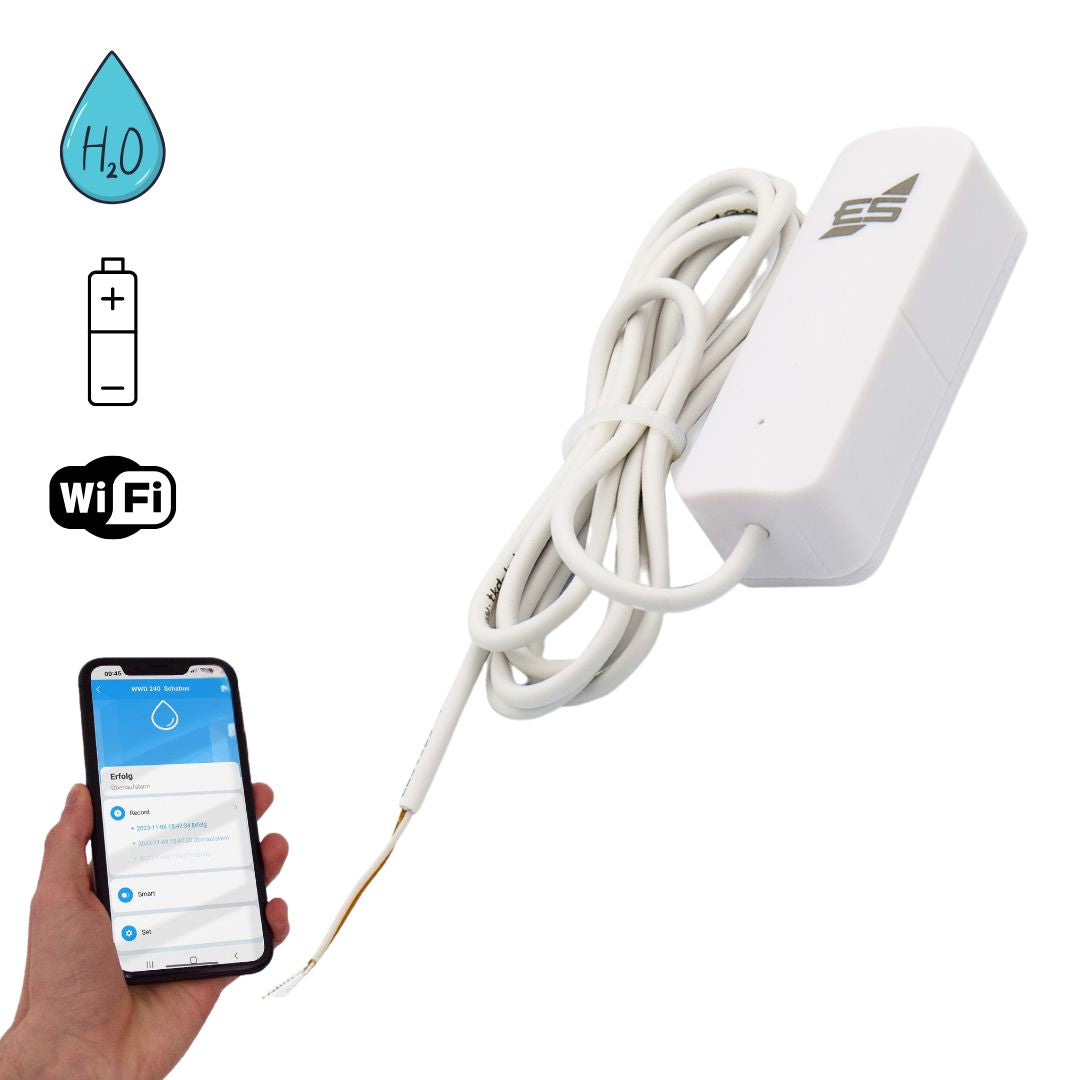
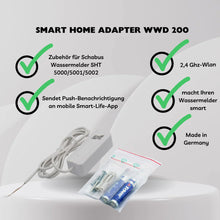
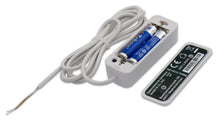
  • WWD Smart Home Adapter - Accessory for SCHABUS water detector SHT 5000 | 5001 | 5002 - makes your water detector smart
  • Battery operated 2 x AAA
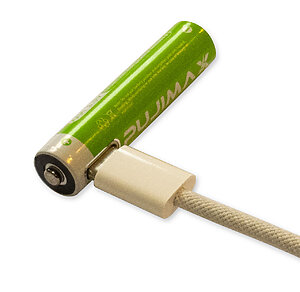
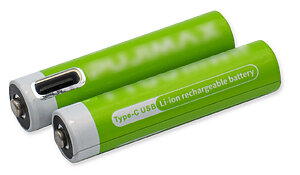
  • Recommended lithium batteries 2 AA, with type C USB connection
  • Push notifications, Smart Life – Install the Smart Living app and register for free
  • 2.4 GHz Wi-Fi
  • Discounts for specialist companies & resellers
  • Personal expert advice (no call center!)
  • Repair service beyond the statutory warranty

Item number: 200200

Delivery time: 2-3 working days

View full details
WWD 200 Smart Home Adapter

WWD 200 Smart Home Adapter

69,00 €
  • Description
  • Technical information
  • Downloads
  • FAQ - Frequently asked questions
  • Reviews

Scope of delivery

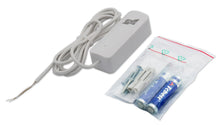
  • WWD 200 Smart Home Adapter
  • Operating instructions WWD 200
  • Mounting material
  • 2 AAA micro batteries

đŸ“¶ WWD 200 smart home adapter

Make your water detectors intelligent – ​​with push notifications directly to your smartphone

The WWD 200 from Elektrotechnik Schabus is the perfect addition to your SHT 5000 , SHT 5001 , or SHT 5002 water detectors. In just a few simple steps, your water detection system becomes "smart" – by forwarding alarms as push notifications to your mobile phone via the free Smart Life app (Android & iOS).

A flashing blue LED on the device also signals a local alarm.

📡the Smart-Live - Smart-living app


đŸ“± App download


🚀 Features & Benefits

  • Push notification in case of alarm
    Instant alerts on your smartphone – even when you’re on the go.

  • Compatible with Smart Life app
    Intuitive setup via free app (for Android & iOS).

  • Easy retrofitting
    The WWD 200 can be connected to existing SHT 5000 / 5001 / 5002 water detectors at any time.

  • Safe battery operation
    Powered by two AAA batteries – recommended: rechargeable lithium batteries with USB-C port.

  • Visual alarm display on site
    Blue LED flashes in addition to the push message when there is a water alarm.


đŸ› ïž Installation & commissioning

  • Mount the device near the water detector (not suitable for outdoor use).

  • Connection via 1.5 m long cable to SHT 5000, 5001 or 5002. Maximum extendable to 20 meters

  • Insert 2x AAA batteries (not included).

  • Wi-Fi connection via 2.4 GHz network required.

  • Connection with the app “ Smart Life – Smart Living ” and integration of the WWD 200.


🔋 SCHABUS recommendation

💡 Tip:
For continuous operation, use modern lithium batteries (size AA) with a USB-C port. These can be easily recharged using a smartphone cable and provide constant power until fully discharged – unlike conventional batteries, whose voltage drops slowly and can compromise the security of the alarm.

[caption id="attachment_20767" align="aligncenter" width="446"] Battery performance chart | Lithium batteries Graphic: Battery Performance | Lithium Batteries[/caption]
Example image

Connection diagram

If the built-in main relay is used, for example, to control a pump, you will need a relay plug-in card for additional alarm forwarding via the WWD 200. This expands the SHT 5000 with four additional relays , allowing multiple functions to be executed independently. WEEE No.: DE91394868


Alarm optical, push message
Weight 0.07 kg
Line 1.5 meters
Humidity 95% RH
Assembly Wall mounting
Electricity = 5uA static, alarm current = 150mA
Temperature -10° to +50C°, working temperature
Wifi 802.11 b/g/n

🔌 How is the WWD 200 connected?

The WWD 200 is connected directly to a compatible water detector (SHT 5000, SHT 5001 or SHT 5002) using the included 1.5m long connection cable and installed nearby. The cable can be used with a suitable LIYY line up to 20 meters be extended.

đŸ“¶ Which Wi-Fi network does the adapter work with?

The WWD 200 is with 2.4GHz WiFi Compatible (802.11 b/g/n). 5 GHz networks are supported. not supported.

đŸ“Č Which app do I need for the WWD 200?

Use the free app “Smart Life – Smart Living” from the Google Play Store or Apple App Store to receive push notifications and configure the adapter.

🔋 Which batteries are recommended?

The adapter requires 2 x AAA batteries. For reliable continuous operation, Schabus recommends modern rechargeable lithium batteries with USB-C port, as they keep their voltage constant until discharge.

🔁 Can I retrofit the adapter?

Yes, the WWD 200 can be retrofitted to an existing water detector at any time.

🧠 What if the relay on my SHT 5000 is already occupied?

If the built-in main relay e.g. B. is used to control a pump, you need a for additional alarm forwarding via the WWD 200 Relay plug-in card. This expands the SHT 5000 with four additional relays, allowing multiple functions to run independently of each other.

Checklist for installation problems:

  • Netzwerkprobleme:
    Überlasteter Router: Wenn zu viele GerĂ€te gleichzeitig mit dem Router verbunden sind, kann es zu Problemen kommen. Trennen Sie einige GerĂ€te vorĂŒbergehend, um den Router zu entlasten. Router-Einstellungen: ÜberprĂŒfen Sie, ob Ihr Router 2,4 GHz unterstĂŒtzt, da viele Smart-
    Home-GerÀte diesen Frequenzbereich benötigen. Router-Name und Passwort: Stellen Sie sicher, dass der WLAN-Name (SSID) und das Passwort korrekt eingegeben wurden. Router-Reichweite: Stellen Sie sicher, dass sich das GerÀt in Reichweite des Routers befindet.
  • GerĂ€teprobleme:
    Reset: Setzen Sie das GerĂ€t auf die Werkseinstellungen zurĂŒck. Wie das geht, hĂ€ngt vom GerĂ€t ab, aber oft ist es ein lĂ€ngeres
    DrĂŒcken einer Reset-Taste oder ein Einund Ausschalten in bestimmten Intervallen (z.B. dreimal ein- und ausschalten). Firmware-Update: ÜberprĂŒfen Sie, ob fĂŒr das GerĂ€t ein Firmware-Update verfĂŒgbar ist und installieren Sie es.
  • App-Probleme:
    App-Version: Stellen Sie sicher, dass Sie die neueste Version der Tuya Smart App verwenden. App-Berechtigungen: ÜberprĂŒfen Sie, ob die App die erforderlichen Berechtigungen fĂŒr den Zugriff auf das WLAN und den Standort hat. App-Cache leeren: Löschen Sie den Cache der App in den Einstellungen Ihres Smartphones. App neu installieren: Wenn alles andere fehlschlĂ€gt, versuchen Sie, die App zu deinstallieren und erneut zu installieren.
  • Verbindungsprozess:
    Blinken des GerÀts: Achten Sie darauf, dass das GerÀt wÀhrend der Verbindung blinkt, was den Netzwerk-Verbindungsmodus anzeigt.
    Warten Sie 10 Sekunden, um zu bestĂ€tigen, dass das GerĂ€t blinkt, bevor Sie fortfahren. GerĂ€t hinzufĂŒgen: In der App gehen Sie auf "GerĂ€t hinzufĂŒgen" oder das Plus-Symbol, wĂ€hlen die passende GerĂ€tekategorie und den WLAN-Typ aus.

Customer Reviews

Be the first to write a review
0%
(0)
0%
(0)
0%
(0)
0%
(0)
0%
(0)
Description

Scope of delivery

  • WWD 200 Smart Home Adapter
  • Operating instructions WWD 200
  • Mounting material
  • 2 AAA micro batteries

đŸ“¶ WWD 200 smart home adapter

Make your water detectors intelligent – ​​with push notifications directly to your smartphone

The WWD 200 from Elektrotechnik Schabus is the perfect addition to your SHT 5000 , SHT 5001 , or SHT 5002 water detectors. In just a few simple steps, your water detection system becomes "smart" – by forwarding alarms as push notifications to your mobile phone via the free Smart Life app (Android & iOS).

A flashing blue LED on the device also signals a local alarm.


📡the Smart-Live - Smart-living app


đŸ“± App download


🚀 Features & Benefits

  • Push notification in case of alarm
    Instant alerts on your smartphone – even when you’re on the go.

  • Compatible with Smart Life app
    Intuitive setup via free app (for Android & iOS).

  • Easy retrofitting
    The WWD 200 can be connected to existing SHT 5000 / 5001 / 5002 water detectors at any time.

  • Safe battery operation
    Powered by two AAA batteries – recommended: rechargeable lithium batteries with USB-C port.

  • Visual alarm display on site
    Blue LED flashes in addition to the push message when there is a water alarm.


đŸ› ïž Installation & commissioning

  • Mount the device near the water detector (not suitable for outdoor use).

  • Connection via 1.5 m long cable to SHT 5000, 5001 or 5002. Maximum extendable to 20 meters

  • Insert 2x AAA batteries (not included).

  • Wi-Fi connection via 2.4 GHz network required.

  • Connection with the app “ Smart Life – Smart Living ” and integration of the WWD 200.


🔋 SCHABUS recommendation

💡 Tip:
For continuous operation, use modern lithium batteries (size AA) with a USB-C port. These can be easily recharged using a smartphone cable and provide constant power until fully discharged – unlike conventional batteries, whose voltage drops slowly and can compromise the security of the alarm.

[caption id="attachment_20767" align="aligncenter" width="446"] Battery performance chart | Lithium batteries Graphic: Battery Performance | Lithium Batteries[/caption]

Example image

Connection diagram

If the built-in main relay is used, for example, to control a pump, you will need a relay plug-in card for additional alarm forwarding via the WWD 200. This expands the SHT 5000 with four additional relays , allowing multiple functions to be executed independently. WEEE No.: DE91394868


Technical information
Alarm optical, push message
Weight 0.07 kg
Line 1.5 meters
Humidity 95% RH
Assembly Wall mounting
Electricity = 5uA static, alarm current = 150mA
Temperature -10° to +50C°, working temperature
Wifi 802.11 b/g/n
Connection examples
FAQ - Frequently asked questions

🔌 How is the WWD 200 connected?

The WWD 200 is connected directly to a compatible water detector (SHT 5000, SHT 5001 or SHT 5002) using the included 1.5m long connection cable and installed nearby. The cable can be used with a suitable LIYY line up to 20 meters be extended.

đŸ“¶ Which Wi-Fi network does the adapter work with?

The WWD 200 is with 2.4GHz WiFi Compatible (802.11 b/g/n). 5 GHz networks are supported. not supported.

đŸ“Č Which app do I need for the WWD 200?

Use the free app “Smart Life – Smart Living” from the Google Play Store or Apple App Store to receive push notifications and configure the adapter.

🔋 Which batteries are recommended?

The adapter requires 2 x AAA batteries. For reliable continuous operation, Schabus recommends modern rechargeable lithium batteries with USB-C port, as they keep their voltage constant until discharge.

🔁 Can I retrofit the adapter?

Yes, the WWD 200 can be retrofitted to an existing water detector at any time.

🧠 What if the relay on my SHT 5000 is already occupied?

If the built-in main relay e.g. B. is used to control a pump, you need a for additional alarm forwarding via the WWD 200 Relay plug-in card. This expands the SHT 5000 with four additional relays, allowing multiple functions to run independently of each other.

Checklist for installation problems:

  • Netzwerkprobleme:
    Überlasteter Router: Wenn zu viele GerĂ€te gleichzeitig mit dem Router verbunden sind, kann es zu Problemen kommen. Trennen Sie einige GerĂ€te vorĂŒbergehend, um den Router zu entlasten. Router-Einstellungen: ÜberprĂŒfen Sie, ob Ihr Router 2,4 GHz unterstĂŒtzt, da viele Smart-
    Home-GerÀte diesen Frequenzbereich benötigen. Router-Name und Passwort: Stellen Sie sicher, dass der WLAN-Name (SSID) und das Passwort korrekt eingegeben wurden. Router-Reichweite: Stellen Sie sicher, dass sich das GerÀt in Reichweite des Routers befindet.
  • GerĂ€teprobleme:
    Reset: Setzen Sie das GerĂ€t auf die Werkseinstellungen zurĂŒck. Wie das geht, hĂ€ngt vom GerĂ€t ab, aber oft ist es ein lĂ€ngeres
    DrĂŒcken einer Reset-Taste oder ein Einund Ausschalten in bestimmten Intervallen (z.B. dreimal ein- und ausschalten). Firmware-Update: ÜberprĂŒfen Sie, ob fĂŒr das GerĂ€t ein Firmware-Update verfĂŒgbar ist und installieren Sie es.
  • App-Probleme:
    App-Version: Stellen Sie sicher, dass Sie die neueste Version der Tuya Smart App verwenden. App-Berechtigungen: ÜberprĂŒfen Sie, ob die App die erforderlichen Berechtigungen fĂŒr den Zugriff auf das WLAN und den Standort hat. App-Cache leeren: Löschen Sie den Cache der App in den Einstellungen Ihres Smartphones. App neu installieren: Wenn alles andere fehlschlĂ€gt, versuchen Sie, die App zu deinstallieren und erneut zu installieren.
  • Verbindungsprozess:
    Blinken des GerÀts: Achten Sie darauf, dass das GerÀt wÀhrend der Verbindung blinkt, was den Netzwerk-Verbindungsmodus anzeigt.
    Warten Sie 10 Sekunden, um zu bestĂ€tigen, dass das GerĂ€t blinkt, bevor Sie fortfahren. GerĂ€t hinzufĂŒgen: In der App gehen Sie auf "GerĂ€t hinzufĂŒgen" oder das Plus-Symbol, wĂ€hlen die passende GerĂ€tekategorie und den WLAN-Typ aus.

Reviews

Customer Reviews

Be the first to write a review
0%
(0)
0%
(0)
0%
(0)
0%
(0)
0%
(0)